Configuration files and environment variables
agents-sandbox supports configuration at two levels: user-level defaults and project-level overrides. Both can set CLI flags and environment variables. This page covers where config lives, the config-file fields, and how values are resolved.
User-level defaults
Place files under ~/.config/agents-sandbox/ to set defaults for all projects:
The tool follows
the XDG base directory spec:
~/.config/agents-sandbox, ~/.cache/agents-sandbox, and ~/.local/state/agents-sandbox are the defaults, but the
XDG_CONFIG_HOME, XDG_CACHE_HOME, and XDG_STATE_HOME environment variables override them when set (and absolute).
| File | Purpose |
|---|---|
~/.config/agents-sandbox/env |
Environment variables forwarded to every sandbox |
~/.config/agents-sandbox/env.secret |
Secret environment variables (legacy, see Secrets) |
~/.config/agents-sandbox/env.secret.yaml |
Secret environment variables (YAML/JSON, see Secrets) |
~/.config/agents-sandbox/config.(y[a]ml\|json[(c\|5)]) |
Configuration file (incl. the home: key; see Home provisioning & startup hooks) |
~/.config/agents-sandbox/<agent>/* |
Agent config snippets, one subdir per agent (e.g. opencode/; see Agent configuration) |
~/.config/agents-sandbox/<slug>/config.(y[a]ml\|json[(c\|5)]) |
Per-project (repo-slug) configuration file, shared by every clone (see Per-slug configuration) |
env uses KEY=value format. env.secret uses KEY=value@host (see Secrets).
Supported configuration formats/filenames: YAML (config.yaml, config.yml), JSON(config.json, config.jsonc, config.json5). The
first one found is used.
Project-level configuration
Place files under .agents-sandbox/ in your project directory. These override user-level defaults.
In a bare checkout — a bare .git with worktrees nested inside it — the project directory is the bare root, next to
.git, and .agents-sandbox/ is read from there rather than from the launched worktree. A .agents-sandbox/ inside a
worktree is ignored, with a warning naming it. See
Bare Checkout with Worktrees Inside; non-bare checkouts (including their
subdirectories) and non-repo folders are unaffected.
| File | Purpose |
|---|---|
.agents-sandbox/Dockerfile |
Custom runner image layers |
.agents-sandbox/env |
Project-specific environment variables |
.agents-sandbox/env.secret |
Project-specific secrets (legacy) |
.agents-sandbox/env.secret.yaml |
Project-specific secrets (YAML/JSON) |
.agents-sandbox/config.(y[a]ml\|json[(c\|5)]) |
Project-specific configuration file (incl. the home: key; see Home provisioning & startup hooks) |
.agents-sandbox/<agent>/* |
Project-specific agent config snippets (see Agent configuration) |
Custom base images
A .agents-sandbox/Dockerfile whose FROM is a specific image is treated as a custom base and the node, agent (and
optional docker) stages are layered on top of it. See Runner Image for the contract: the base
must provide the selected agent’s in-VM runtime tools (curl, nohup, and pkill for the daemon agents), /bin/bash (the
launcher’s attach and volume-edit sessions run /bin/bash -l), the docker prerequisites when docker runs, and idempotency
for an existing docker/node/agent. The build checks the runtime tools, so a missing one fails early with its name.
Precedence
Configuration is resolved in this order (later entries override earlier ones):
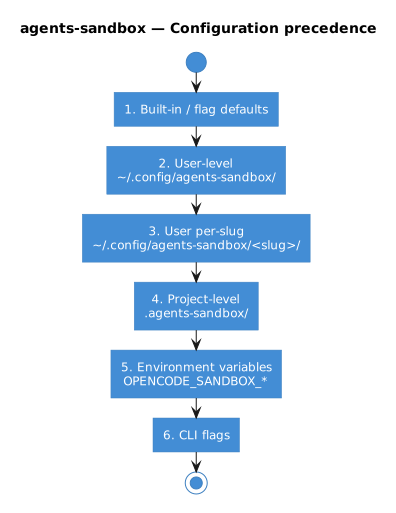
- Built-in / flag defaults — compiled-in values and CLI flag defaults
- User-level —
~/.config/agents-sandbox/ - User per-slug —
~/.config/agents-sandbox/<slug>/ - Project-level —
.agents-sandbox/ - Legacy environment variables — the pre-rename prefix (see Deprecations)
- Environment variables —
AGENTS_SANDBOX_<KEY> - CLI flags — always win when explicitly passed
Configuration file
| Field | CLI flag | Environment variable | Description |
|---|---|---|---|
yes |
--yes / -y |
AGENTS_SANDBOX_YES |
Assume yes to all prompts |
quiet |
--quiet / -q |
AGENTS_SANDBOX_QUIET |
On list commands, print identifiers only; otherwise suppress stdout output |
log-level |
--log-level / -l |
AGENTS_SANDBOX_LOG_LEVEL |
Minimum log level to show on the console: error, warning, info, verbose (default info) |
cpus |
--cpus / -c |
AGENTS_SANDBOX_CPUS |
Number of vCPUs for the VM |
memory |
--memory / -m |
AGENTS_SANDBOX_MEMORY |
Memory limit (e.g. 8G) |
disk-size |
--disk-size |
AGENTS_SANDBOX_DISK_SIZE |
Project VM root disk size (e.g. 16G). Empty = microsandbox runtime default (~4 GiB). Applied at VM creation; a change triggers recreation. An invalid value is rejected with an error. |
tmp-size |
--tmp-size |
AGENTS_SANDBOX_TMP_SIZE |
Size of /tmp tmpfs in the sandbox. An invalid value is rejected with an error. |
workspace-quota |
--workspace-quota |
AGENTS_SANDBOX_WORKSPACE_QUOTA |
Guest-write quota for the /workspace bind mount (e.g. 32G), bounding writes on top of the host repo. Default 16G. Applied at VM creation; a change triggers recreation. An invalid value is rejected with an error. |
auto-prune-age |
— | AGENTS_SANDBOX_AUTO_PRUNE_AGE |
Auto-prune threshold, runs before every command (default: 30d, only in config). Applies to VMs, volumes, and images alike. |
manual-prune-age |
--older-than |
AGENTS_SANDBOX_MANUAL_PRUNE_AGE |
Default prune age threshold for prune, image prune, volume prune, and sandbox prune (--age is a deprecated alias) |
auto-stop-on-active-sessions |
— | AGENTS_SANDBOX_AUTO_STOP_ON_ACTIVE_SESSIONS |
Stop VM immediately on client detach without waiting for active sessions (default: false, only in config; busy sessions are never cut off) |
auto-stop-timeout |
— | AGENTS_SANDBOX_AUTO_STOP_TIMEOUT |
Idle timeout after last client detaches (default: 10s, only in config) |
auto-stop-max-session-retries |
— | AGENTS_SANDBOX_AUTO_STOP_MAX_SESSION_RETRIES |
Retries to tolerate for a session stuck in retry before stopping (default: 10, only in config) |
network.profile |
--network |
AGENTS_SANDBOX_NETWORK_PROFILE |
Network profile(s): a comma-separated list of public, private, and host, or the terminal none (default public; see Networking) |
network.egress-allow |
— | — | Egress destinations to allow: host, a CIDR, or a .suffix (config-file only; see Networking) |
network.egress-deny |
— | — | Egress carve-outs, emitted before allow rules (config-file only; see Networking) |
network.dns-servers |
--dns |
AGENTS_SANDBOX_NETWORK_DNS_SERVERS |
DNS upstream resolvers: bare IP (auto-appends :53) or host:port (see Networking) |
mounts |
— | — | Additional host directories mounted into the VM (config-file only; see Host mounts) |
agent |
--agent |
AGENTS_SANDBOX_AGENT |
Agent profile name to run, build, and provision (default opencode2, see Agent configuration) |
provision-host-config |
— | AGENTS_SANDBOX_PROVISION_HOST_CONFIG |
Copy the agent’s host config + credentials into the VM by default (default: true; set false to opt out, see Default drop-in provisioning) |
docker |
--docker |
AGENTS_SANDBOX_DOCKER |
Append the Docker engine block to the runner image (overridable with --docker; dind is a deprecated alias) |
upgrade.mode |
— | AGENTS_SANDBOX_UPGRADE_MODE |
How to handle a newer release when one is found: prompt, notify, auto, or auto-exit (default prompt, see Self-upgrade) |
upgrade.interval |
— | AGENTS_SANDBOX_UPGRADE_INTERVAL |
How often to check for a newer release (default 1d, minimum 1h, see Self-upgrade) |
upgrade.channel |
— | AGENTS_SANDBOX_UPGRADE_CHANNEL |
Opt into a release channel: stable (default) or canary (see Self-upgrade) |
notify.desktop |
— | AGENTS_SANDBOX_NOTIFY_DESKTOP |
Show desktop notifications via notify-send (Linux) / osascript (macOS) (default false, see Notifications) |
notify.audio |
— | AGENTS_SANDBOX_NOTIFY_AUDIO |
Audio notification channel: system, bell, or off (default off, see Notifications) |
notify.on-input |
— | AGENTS_SANDBOX_NOTIFY_ON_INPUT |
Notify when the agent is waiting on user input (default false) |
notify.on-done |
— | AGENTS_SANDBOX_NOTIFY_ON_DONE |
Notify when a busy session returns to idle (default false) |
notify.on-error |
— | AGENTS_SANDBOX_NOTIFY_ON_ERROR |
Notify on a session.error event (default false) |
notify (override) |
--notify |
AGENTS_SANDBOX_NOTIFY |
Override the notify mode for one invocation: on, off, desktop, or audio (see Notifications) |
Every field in this table can also be set with its environment variable, except the list and map fields shown with
— (network.egress-allow, network.egress-deny, and mounts), which are set in the config file. Env vars take precedence over config files
but lose to an explicitly passed CLI flag. The prefix is AGENTS_SANDBOX_; dashes and dots in the field name become
underscores.
The pre-rename environment-variable prefix (see Deprecations) is still
accepted as a deprecated alias. It sits between config files and AGENTS_SANDBOX_ in precedence,
and using one prints a one-time deprecation warning. When both prefixes set the same field, the
AGENTS_SANDBOX_ value wins. The alias will be removed in a future release; migrate your
configuration to AGENTS_SANDBOX_.
Action toggles (--rebuild, --dry-run, --force, …) are CLI-only and cannot be set via
config file or env var.
Example ~/.config/agents-sandbox/config.yaml:
log-level: verbose
cpus: 4
memory: 8G
disk-size: 16G
workspace-quota: 32G
auto-prune-age: "7d"
manual-prune-age: "7d"
auto-stop-on-active-sessions: false
auto-stop-timeout: "10s"
auto-stop-max-session-retries: 10
network:
  profile: none
  egress-allow: []
  egress-deny: []
mounts:
  /home/dev/.m2: ~/.m2
notify:
  desktop: true      # notify-send (Linux) / osascript (macOS)
  audio: system      # system | bell | off
  on-input: true     # agent waiting on input
  on-done: true      # busy -> idle
  on-error: true     # session.error
upgrade:
  mode: notify
  interval: "7d"
Duration fields
The auto-prune-age field (for run/shell auto-pruning), manual-prune-age field (for prune/image prune/
volume prune/sandbox prune default), auto-stop-timeout field (for post-detach idle timeout), and upgrade.interval
field (for the self-upgrade check) accept:
- Go duration:
"7200000000000ns","2h","24h" - Days shorthand:
"7d","14d"
Validation
The launcher validates:
cpusmust be between 0 and 255upgrade.modemust be one ofprompt,notify,auto,auto-exitupgrade.intervalmust be at least1h(a floor guarding against GitHub rate limits)upgrade.channelmust bestableorcanary(an unknown value is rejected)
Invalid config files prevent the launcher from starting.
Resource Config Application
When a session is started against a VM, resource config changes need to be applied before taking effect in the new session. The change type determines the mechanism used to apply the new settings:
| Resource | Change type | Behavior |
|---|---|---|
cpus |
Live Modify | Applied live via SDK Modify (hotplug) |
memory |
Live Modify | Applied live via SDK Modify (hotplug) |
env |
VM recreate | microsandbox cannot apply env live or on a daemon restart, so the VM is rebuilt; env is baked in at creation |
secrets |
VM recreate | microsandbox cannot apply secrets live or on a daemon restart, so the VM is rebuilt; secrets are baked in at creation |
agent config |
Daemon restart | Files are always copied into the VM (provisioning); the agent daemon is restarted in-place to pick them up |
tmp-size |
VM recreate | VM is stopped, removed, and rebuilt with new tmpfs size. Home volume is preserved. |
disk-size |
VM recreate | VM is stopped, removed, and rebuilt with new disk size. Home volume is preserved. |
workspace-quota |
VM recreate | VM is stopped, removed, and rebuilt with new workspace write quota. Home volume is preserved. |
image |
VM recreate | VM is recreated with the new root image. Home volume is preserved. |
home volume |
VM recreate | After volume migrate/reset, the new home volume is mounted by recreating the VM; the mount is baked in at creation. |
network |
VM recreate | Network policy is baked in at VM creation, so a change recreates the VM. Home volume is preserved. |
mounts |
VM recreate | Host bind mounts are baked in at VM creation. |
When no other client is attached, config changes apply immediately.
Agent/home config files are provisioned into the VM on every startup, so a change is picked up by the next daemon start
even when the current daemon is kept running. Only the agent config change prompts for a daemon restart;
home: file changes are applied on the next startup without any prompt, since they do not require the daemon to restart.
Parallel Sessions
When multiple agents-sandbox sessions are actively connected to a VM, applying a resource change by recreating the VM
may disrupt active sessions. In this case, the launcher will prompt you whether to keep the current VM (defer),
recreate, or quit to abort the change. The default is to keep/defer.
Per-slug configuration
Beyond the generic user-level config, you can provide config for a specific project at
~/.config/agents-sandbox/<slug>/config.yaml (slug = the project’s repo slug, derived from the origin remote URL, so
every clone of one remote shares this directory). It sits between the generic user-level config and the project-level
config in precedence; see Precedence for the full order.
The same formats/filenames as the generic user config are supported (config.yaml, config.yml, config.json,
config.jsonc, config.json5).
Because the per-slug dir is keyed by the repo slug, it is shared by every clone of one remote. Run
agents-sandbox config paths to print the resolved layers, the concrete per-slug dir, and the repo slug.
Environment variables
Two files define environment variables passed to the sandbox:
~/.config/agents-sandbox/env— user-level, every project.agents-sandbox/env— project-level, current project only
Format: one KEY=value per line. Comments (lines starting with #) and blank lines are ignored.
# .agents-sandbox/env
FOO=bar
DATABASE_URL=postgres://localhost/mydb
These are available to the agent and any child processes inside the sandbox.