Sandboxes
agents-sandbox gives each project its own sandbox, a virtual machine that runs your agents. The sandbox keeps its state between runs and stops on its own when it has been idle.
Quick reference
You rarely manage sandboxes by hand: a run creates or reuses one for you. This table is the short answer for the cases where you do; the sections that follow carry the detail.
| I want to … | Run |
|---|---|
| See all sandboxes | agents-sandbox list |
| Stop the project sandbox | agents-sandbox stop |
| Remove the project sandbox | agents-sandbox sandbox remove <name> |
| Reclaim stale sandboxes, volumes, and images | agents-sandbox prune --dry-run, then agents-sandbox prune --yes |
| See storage use | agents-sandbox df |
Listing sandboxes
agents-sandbox list
agents-sandbox sandbox list
Columns: NAME, IMAGE, STATUS, CREATED (YYYY-MM-DD HH:MM:SS). The STATUS cell is colored like
microsandbox when color is enabled: running in green, stopped/created dim, transitional states (starting,
paused, draining) in yellow, and crashed in red. With color disabled (for example, piped output) the status
renders as plain text.
A sandbox follows microsandbox’s state machine:
| Status | Meaning |
|---|---|
created |
No live runtime; started on the next run. |
starting |
A protected boot is in progress; concurrent runs wait for it. |
running |
Accepts clients. |
draining, paused |
Protected from pruning but reject new clients. |
stopped, crashed |
No live runtime; can be started again. |
Unknown statuses are treated as unsafe and are not pruned or reused automatically.
Pruning
Reclaim stale sandboxes, home volumes, and images:
agents-sandbox prune                       # use manual-prune-age from config (default: 7d)
agents-sandbox prune --older-than 24h      # 24-hour threshold
agents-sandbox prune --dry-run             # preview only
agents-sandbox prune --yes                 # skip confirmation
Prune prompts for confirmation before removing anything (defaulting to no). Pass --yes to skip the prompt;
non-interactively, --yes is required or the command fails fast. --dry-run only previews and never prompts.
To prune a single artifact type rather than everything, use the dedicated subcommands:
agents-sandbox image prune                 # cached runner images
agents-sandbox volume prune                # home volumes
agents-sandbox sandbox prune               # sandboxes (stale ones and leftover task workers)
Pruning removes:
- Stale sandboxes (not active in the age threshold) and everything they reference; task sandboxes count into the sandbox total. A stale sandbox’s home volumes and images are reclaimed based on the snapshot taken at prune time, even if the sandbox’s own removal fails.
- Dangling runner images of projects whose sandbox is gone (for example, after
kill --force, or a prune whose image removal failed). The prune snapshot tracks which slugs have a live sandbox, so it can tell a live project apart from a sandbox-less one and reclaim the latter’s cached images. - Surplus msb images of a project that still has a sandbox. Retained are the per-agent
-latesttags plus the images a kept sandbox currently references (a stopped-not-yet-stale sandbox may still point at a pre-redesign digest ref); every other ref (orphaned content, old digest refs no sandbox uses) is reclaimed. - Dangling Docker images: after a rebuild the previous runner image is no longer referenced by any tag and is reclaimed
by a scoped Docker image prune. Tagged images (base images and the current
:latestrunner) are left untouched.
Age is applied when deciding which sandboxes are stale, and that decision is shared across sandboxes and home volumes: a project whose sandbox has activity in the age threshold is left alone entirely. Home volumes are reclaimed only when the project’s sandbox is actually pruned (never for a merely sandbox-less project, since they hold user data), while runner images of a sandbox-less project are reclaimed because they can always be rebuilt.
Auto-pruning runs before run commands (for example, agents-sandbox, agents-sandbox run, agents-sandbox sandbox run)
via sync.Once. It uses a fixed default threshold of 30 days unless auto-prune-age is set in config.
Stopping and removing a sandbox
agents-sandbox stop                    # graceful stop; state stays for the next run
agents-sandbox stop -f                 # stop and remove the sandbox's persisted state
agents-sandbox kill                    # force power-off; state may be corrupted
agents-sandbox kill -f                 # kill and remove the sandbox's persisted state
agents-sandbox sandbox remove <name>   # remove the sandbox
stop is graceful and keeps the sandbox’s state, so the next run starts from where you left off. kill powers the
sandbox off immediately, without a graceful shutdown, and its state may be corrupted. The -f (--force) flag on stop
or kill also removes the sandbox’s persisted state. sandbox remove deletes the sandbox but leaves that state in
place, so the next run recreates the sandbox against the same recorded home volume, and it refuses a running sandbox
unless --force is set, which stops it first.
Note: Stopping or removing a sandbox never deletes its home volume. The volume holds the agent’s state and configuration, and
prunereclaims it; see Pruning.
Lifecycle
Each run follows this lifecycle:
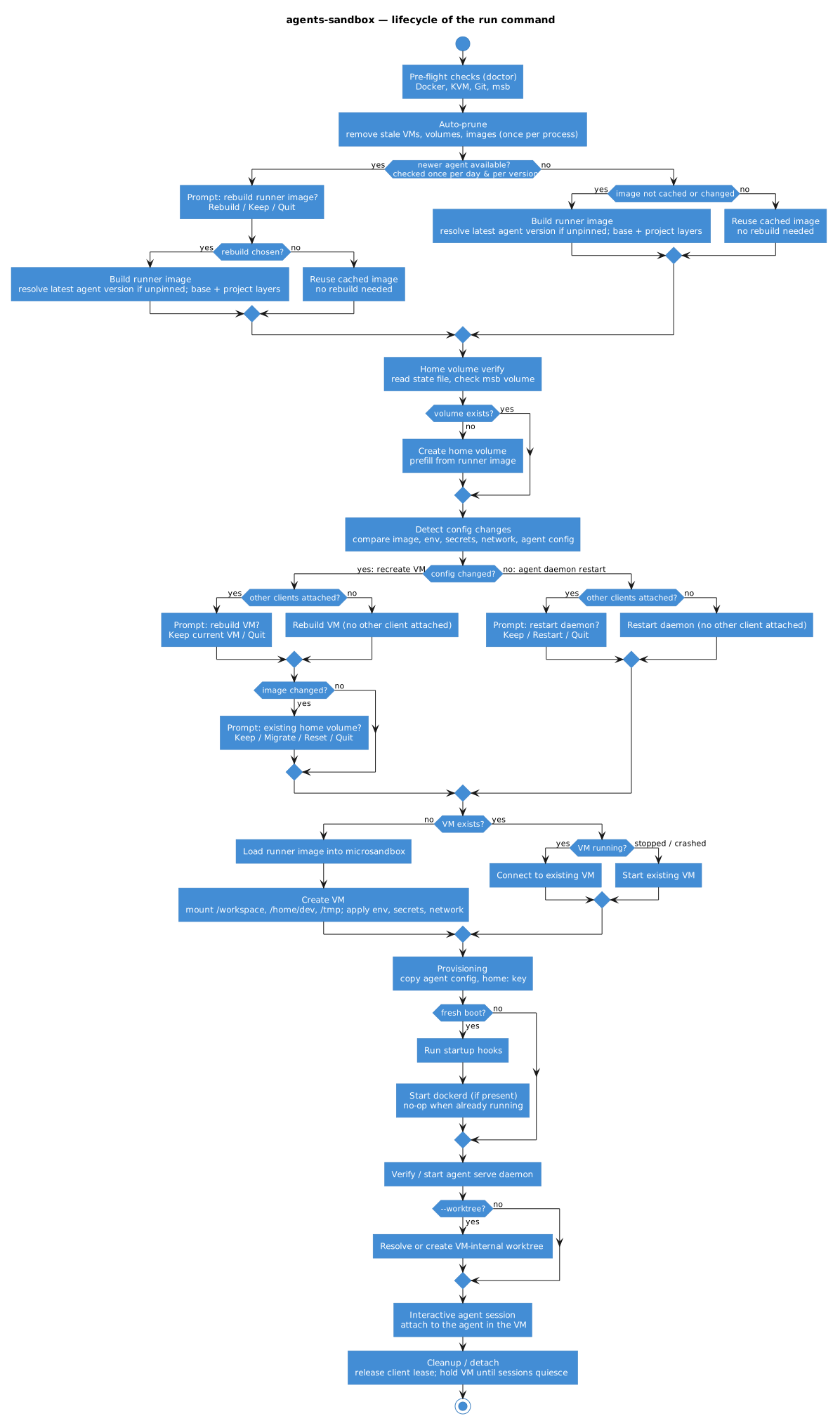
- Auto-prune: Remove stale sandboxes, volumes, and images
- Pre-flight checks (doctor): Docker, KVM, Git, private microsandbox runtime
- Image verify/build: `.agents-sandbox/Dockerfile` (or default image) → Docker image -> microsandbox image (read from the bare root next to `.git` in a bare checkout)
- Home volume verify/build: Persistent microsandbox home volume (`<checkout-slug>-<agent>-<timestamp>`) per checkout
- Sandbox creation or reuse: New or existing project-specific sandbox
- Provisioning: Copy agent config etc. (updated configs are re-provisioned).
- Daemon verify/start: Ensure/start microsandbox internal services
- Branch resolve: If `--worktree` (`-w`) specified, reuse or create an agent sandbox-internal worktree via daemon API
- Agent run: Execute the agent's attach command (e.g. `opencode attach`) against the worktree inside the sandbox
- Cleanup: Detach
Identity: one sandbox per checkout and agent
Each checkout gets its own sandbox, and each agent inside it gets its own. The sandbox name is built from the checkout and the agent:
<checkout-slug>-<agent>
Artifact names carry no vendor prefix. An artifact created by an earlier version keeps its agents-sandbox-… prefix
(project sandbox agents-sandbox-vm-…, task sandbox agents-sandbox-task-…, home volume agents-sandbox-home-…);
both shapes are found and reused, so an upgrade never rebuilds a sandbox or reimports an image. A reused legacy sandbox
keeps its legacy name until it is next recreated, then comes back prefix-free.
Project identity splits into two slugs, each governing the artifacts whose unit it matches:
- checkout slug — derived from the checkout’s resolved git common directory. It keys the state directory, the sandbox name, the home volume, the locks, and the runner image tag. Two clones of one remote therefore get separate sandboxes and home volumes, while a checkout and the worktrees inside it share one. A worktree outside its checkout hashes its own root, so it gets its own identity — state, sandbox, home volume, and image tag — rather than being refused.
- repo slug — derived from the origin remote URL. It keys the per-slug user config dir
(
~/.config/agents-sandbox/<repo-slug>/, see Per-slug configuration) and theorg.agents-sandbox.projectgrouping label, solist --label project=<repo-slug>and that config dir are shared by every clone.
Both slugs have the <folder>-<hash> shape; <folder> is the origin’s repository name, or the checkout’s own name when
there is no origin. The repo slug hashes the origin URL; the checkout slug hashes the resolved git common dir. For
example, a repo cloned from git@github.com:inoio/myproject.git gets a sandbox named
myproject-<hash>-opencode, where <hash> comes from that checkout’s common dir — so two clones read
the same folder name but different hashes. Runner images are built per checkout, so two clones with identical
Dockerfiles each build their own tag; the second build is a cache hit against the shared BuildKit cache.
The /workspace bind follows the identity: a run from inside a checkout, a worktree nested in it, or a subdirectory of
either binds the enclosing checkout root, and an outside worktree binds its own root. The agent still starts in the
subdirectory the run was invoked from.
The sandbox is per checkout and agent, not per invocation. Subsequent runs connect to the existing sandbox (or start it if stopped) rather than creating a new one. When the Docker image’s Dockerfile has changed, the existing sandbox has to be recreated, but it keeps its name. The home volume is untouched, so no user state is lost; see Home volumes.
Sandboxes, home volumes, and state are scoped per --agent, so switching agents no longer tears down the project
sandbox, and multiple agents (e.g. opencode and opencode2) can serve the same project concurrently. Sandboxes
created by earlier per-project versions (which did not carry an agent suffix) are abandoned rather than migrated —
they are not picked up by the agent-scoped names, and are reclaimed by prune.
Home volumes
A home volume is the persistent $HOME inside the sandbox: it holds the agent’s configuration and its session history.
It survives the sandbox being destroyed and the Dockerfile changing.
Volume lifecycle
Home volumes are named <checkout-slug>-<agent>-<timestamp>. Which home volume is current is stored in the
project’s state file (~/.local/state/agents-sandbox/<checkout-slug>/<agent>/state.yaml).
When the Dockerfile changes (new image digest), most of the time the current home volume can continue to be used. Keeping it is only a problem when the Dockerfile change also changes the home directory. So when a Dockerfile change actually leads to a sandbox rebuild (and not just the sandbox continuing on the current image, for example when the rebuild is deferred to a later run), agents-sandbox prompts you to decide what to do with the home volume:
| Choice | What happens |
|---|---|
| keep | Keep using the current home volume. |
| reset | Build a completely new home volume from the new sandbox’s home directory, discarding the current home (for example, losing the agent’s session history). |
| migrate | Build a new home volume like reset, then copy all files from the current home on top. |
A rebuild that is deferred — the VM keeps running on the current image — skips the prompt. In non-interactive mode the existing home volume is kept and you are told the image changed. The old volume is always kept, and the state file is only updated once the chosen action has actually executed.
Managing volumes
List all volumes:
agents-sandbox volume list
Columns: NAME, KIND, SIZE, CREATED (YYYY-MM-DD HH:MM:SS). SIZE shows capacity for disk volumes and quota for
directory volumes, or - when unavailable.
Manual management:
agents-sandbox volume migrate        # new volume, copy old volume files on top
agents-sandbox volume reset          # fresh volume from image
agents-sandbox volume edit           # new volume alongside old, manual transfer in a shell environment
agents-sandbox volume remove <name>  # delete a home volume (get the name from `volume list`)
The chosen volume is recorded in the state file, and the next run recreates the project sandbox so the new volume is
mounted at $HOME. Until then the running sandbox keeps the previous home volume mounted.
Home volumes are pruned when:
- You run
volume migrate|resetwith--rm(removes the old volume) pruneis run with an age threshold older than the volume’s last use- The state file is missing and a fresh volume is created (old volumes become orphaned)
Idle timeout: when a sandbox stops
opencode is the only agent that waits for its sessions to finish before the sandbox stops; opencode2, pi, and Claude
Code skip that wait and stop as soon as the idle timeout expires. The idle timeout is auto-stop-timeout, which
defaults to 10 seconds.
When the last client detaches, the sandbox is not stopped immediately. The launcher first evaluates
auto-stop-on-active-sessions:
auto-stop-on-active-sessions |
Behaviour |
|---|---|
false (default) |
Wait for quiescence. The sandbox is held while opencode sessions are in flight and is allowed to stop once every session is quiescent. |
true |
Stop immediately. The sandbox is not held for in-flight work; it stops via the idle timeout even while sessions are busy. |
A session counts as quiescent once no session is stuck in retry beyond auto-stop-max-session-retries (default 10).
A busy session with a pending, unanswered question also counts as quiescent, because the agent is waiting for you
rather than working; a busy session blocked without such a question (and with no client connected) is left alone
rather than interrupted, and it blocks the stop. A graceful stop keeps the sandbox and its home volume, so the next run
restarts in under a second. To clean up a stale sandbox, stop it manually or let prune reclaim it.
Set all three fields in launcher config:
auto-stop-timeout: "10s"
auto-stop-on-active-sessions: false
auto-stop-max-session-retries: 10
See Launcher configuration for the full field table. None of the three has a CLI flag.
Concurrency
Only one sandbox is created per checkout and agent, so concurrent invocations of agents-sandbox share it: additional sessions connect to the existing sandbox rather than creating one.
A host-side file lock (~/.local/state/agents-sandbox/locks/<checkout-slug>/<agent>.lock) prevents race conditions
during first boot creation.
When another client is attached, config changes that would restart the agent daemon or recreate the sandbox trigger a prompt asking whether to keep the running server/sandbox (defer), proceed, or quit (abort the apply). The default is always to defer — existing sessions are never cut off. Choosing to keep still provisions the updated config files into the sandbox, so the next daemon restart picks them up; only the restart itself is deferred. See Configuration for details on how resource changes are applied and their reconnect semantics.
Why agents-sandbox runs its own runtime
This section is background: it explains why agents-sandbox does not use a microsandbox you installed yourself, and you do not need it to use the sandboxes this page describes.
agents-sandbox provisions its own isolated microsandbox runtime under its data directory
(~/.local/share/agents-sandbox/msb, or $XDG_DATA_HOME/agents-sandbox/msb), so it neither depends on nor interferes
with a microsandbox you installed yourself. A system-wide microsandbox is therefore not required, and no particular
msb version has to be present. agents-sandbox never uses ~/.microsandbox as its runtime and never writes to it. The
only exception is the one-time legacy home-volume migration, which reads that directory to copy your old volumes; see
Upgrading to 0.6 for its mechanics.
Owning the runtime also means managing it: df (and the storage group) reports its storage by category, while
sandbox, volume, and image inspect/remove cover the sandboxes, home volumes, and images it owns.