Architecture & Concepts
Each run builds an image, creates or reuses a sandbox, provisions your configuration, and attaches the agent. This page describes that flow and how a project’s identity and state are laid out.
What a run does
- Image build — Builds a Docker image from
.agents-sandbox/Dockerfileif present, or uses the base image (in a bare checkout the project directory is the bare root next to.git). The image contains the selected coding agent, Node.js (when the agent needs it), and common CLI tools. - Volume setup — Creates a persistent home volume (managed by the private microsandbox runtime, name:
<checkout-slug>-<agent>-<timestamp>) for the checkout, preserving editor state, caches, and config across sessions. - VM creation or reuse — Creates a new project VM on first boot; subsequent runs connect to the existing VM (or restart it if it stopped).
- Provisioning — Merges your agent’s config snippets into a single config in the VM home (e.g.
opencode.jsonc), provisionshome:mappings, and syncs them into the VM. - Agent — Runs the agent’s attach command (e.g.
opencode attach) inside the VM, forwarding any arguments after--to the AI agent. - Cleanup — On exit, the client detaches and the VM remains available for reuse or is stopped by its idle policy. In a
normal session
/workspaceis the host repository and remains intentionally shared; only--worktreesessions use a VM-internal worktree that leaves the host checkout untouched. When launched from inside a git worktree or a repository subdirectory,/workspaceis bound to the enclosing checkout root rather than the current directory.
See the Commands reference for the full API and Configuration for tuning behavior.
Project identity and migration
Each checkout gets its own project identity. A checkout-scoped slug (the hash of the checkout’s resolved git common
dir) keys the state directory, VM name, home volume, locks, and runner image tag; a repo-scoped slug (the hash of the
origin URL) keys the per-slug user config dir and the org.agents-sandbox.project grouping label. Two clones of one
remote therefore get separate VMs and home volumes and share a runner image only best-effort through the build cache; a
checkout and the worktrees inside it share everything, while a worktree outside its checkout gets its own identity.
The artifacts a project owns — its project VM (<checkout-slug>-<agent>), transient task sandboxes
(<checkout-slug>-<agent>-<nanos>), home volume (<checkout-slug>-<agent>-<timestamp>) and microsandbox image reference
(<checkout-slug>:<agent>-latest) — carry no vendor prefix. (The Docker image tag keeps the
agents-sandbox/runner- prefix so it stays distinguishable in the system Docker daemon; see
Runner Image.) Artifacts created by an earlier version keep their agents-sandbox-…
prefix and are still found and reused, never rebuilt or reimported; only newly created artifacts use the prefix-free
names, so a reused legacy VM is renamed to the new scheme the next time it is recreated.
The first run after upgrading from a version that keyed everything by the origin slug migrates automatically, with a
warning notice rather than a prompt. It destroys the legacy origin-keyed VM first, then recursively merges the legacy
state directory onto the checkout slug. The merge never overwrites an existing file: anything it cannot move is reported
and left in place. A --dry-run does neither and keeps resolving against the legacy layout.
If the legacy VM survives but its state file was lost, its mounted home volume is recorded in the checkout state before the VM is destroyed, and the next run reuses that volume — so a lost state file never costs the saved credentials or files, whichever command triggers the migration.
System context
The following C4 container diagram shows how agents-sandbox relates the host to the microsandbox VM: your project
directory is bound into the VM as /workspace, persistent state lives on a home volume at /home/dev, secret-channel values
are supplied host-side, and one or more clients attach to the server running inside the VM.
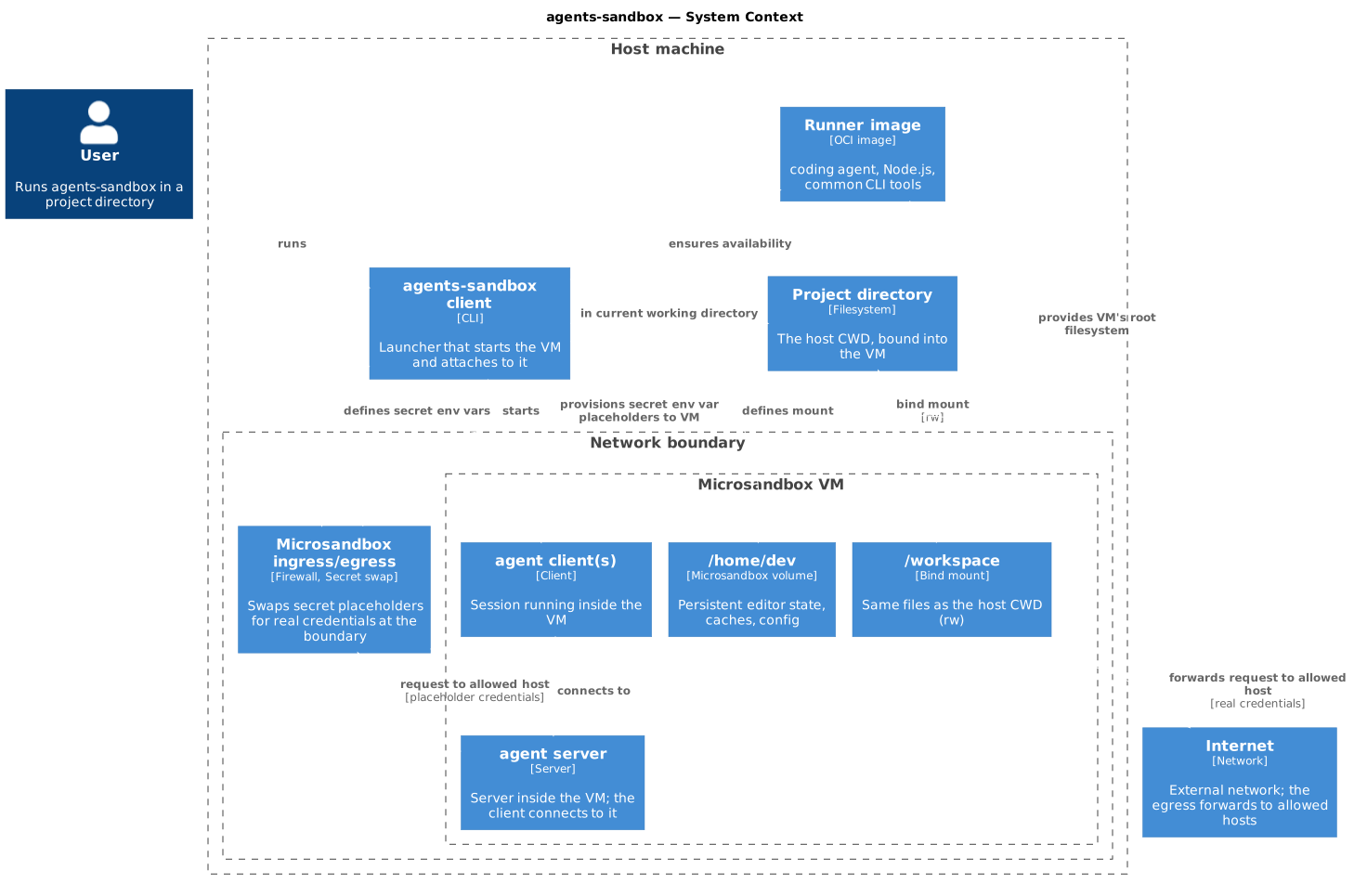
/workspace and the host CWD are the same files — edits inside the VM appear on the host and vice-versa. Ordinary rwx
permission bits set inside the VM (for example the executable bit restored by an in-VM git checkout) are mirrored onto
the host files, so host git working trees stay consistent with what the VM sees. Values supplied through
the env.secret mechanism do not live in the image or project volume: the guest receives a placeholder and the proxy can
substitute the real value only for an allowed destination. Credential files copied or provisioned by other means are ordinary
files in the VM. Multiple clients can attach to the same VM concurrently.